
Press Ctrl+ and K to search
请注意,本文编写于 138 天前,最后修改于 138 天前,其中某些信息可能已经过时。
目录
一、环境配置
1.准备了三台机器
js192.168.201.112
192.168.201.113
192.168.201.114
jshostnamectl set-hostname  ELK01
hostnamectl set-hostname  ELK02
hostnamectl set-hostname  ELK03
jscat >> /etc/hosts <<EOF
192.168.201.112 ELK01
192.168.201.113  ELK02
192.168.201.114  ELK03
EOF
2.临时关闭防火墙
jssystemctl stop firewalld
3.永久关闭防火墙
jssystemctl disable firewalld
4.关闭内存交换分区
jsswapoff -a
jsvim /etc/fstab
# 注释 swap 行
5.关闭selinux
jssetenforce 0
6.同步服务器时间
jsyum install ntpdate -t
ntpdate -u ntp.aliyun.com
timedatectl set-timezone Asia/Shanghai
7.配置免密
A服务器 配置免密登录 如果没有~/.ssh目录下没有东西或没目录,用以下命令重新生成一下
js# 强制创建.ssh目录并设置权限
mkdir -p ~/.ssh
chmod 700 ~/.ssh

# 生成RSA密钥对(无密码)
ssh-keygen -t rsa -b 4096 -f ~/.ssh/id_rsa -N ""

# 设置密钥权限
chmod 600 ~/.ssh/id_rsa
chmod 644 ~/.ssh/id_rsa.pub

# 将公钥追加到authorized_keys
cat ~/.ssh/id_rsa.pub >> ~/.ssh/authorized_keys
chmod 600 ~/.ssh/authorized_keys
把 A服务器 的公钥给到 B服务器,把 A服务器 的公钥放到 B服务器 的~/.ssh/authorized_keys里面
js#A服务器执行
cat id_rsa.pub
js#B服务器执行,然后把A服务器执行的查看到的公钥复制到B服务器
vi ~/.ssh/authorized_keys
二、安装Elasticsearch 7.17.29(单机部署)
核心功能:分布式搜索和分析引擎,负责存储、索引和快速检索数据(如日志、指标等)。
特点:支持实时搜索、高扩展性,通过倒排索引实现高效查询。
下载地址:https://www.elastic.co/downloads/past-releases/elasticsearch-7-17-29
rpm部署
jsrpm elasticsearch-7.17.29-x86_64.rpm
启动服务
jssystemctl start elasticsearch.service
修改配置文件
jsvi /etc/elasticsearch/elasticsearch.yml
yml# ======================== Elasticsearch Configuration =========================
#
# NOTE: Elasticsearch comes with reasonable defaults for most settings.
#       Before you set out to tweak and tune the configuration, make sure you
#       understand what are you trying to accomplish and the consequences.
#
# The primary way of configuring a node is via this file. This template lists
# the most important settings you may want to configure for a production cluster.
#
# Please consult the documentation for further information on configuration options:
# https://www.elastic.co/guide/en/elasticsearch/reference/index.html
#
# ---------------------------------- Cluster -----------------------------------
#
# Use a descriptive name for your cluster:
#
#cluster.name: my-application
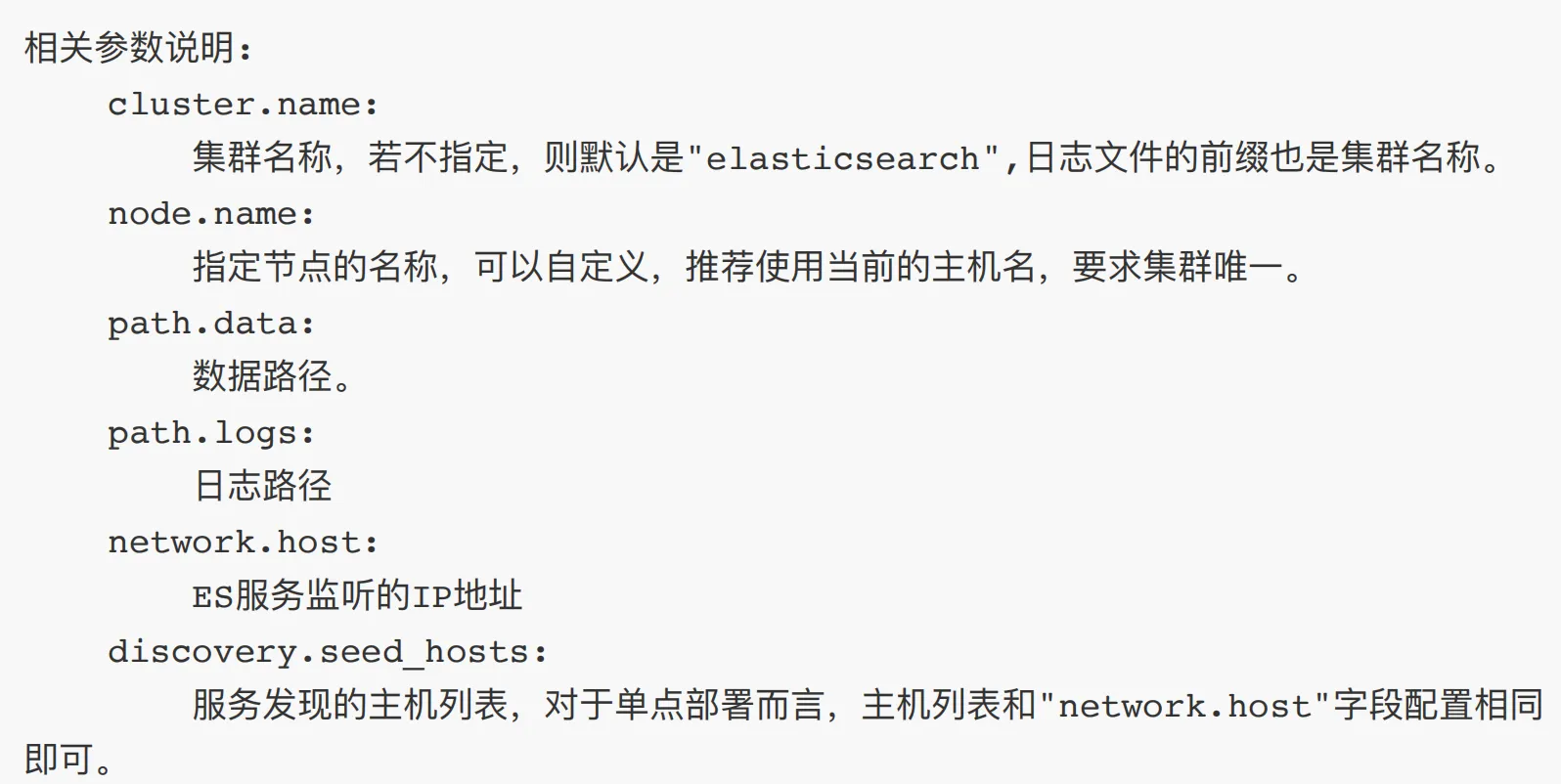
cluster.name: my-elk
#
# ------------------------------------ Node ------------------------------------
#
# Use a descriptive name for the node:
#
#node.name: node-1
node.name: elk01
#
# Add custom attributes to the node:
#
#node.attr.rack: r1
#
# ----------------------------------- Paths ------------------------------------
#
# Path to directory where to store the data (separate multiple locations by comma):
#
path.data: /var/lib/elasticsearch
#
# Path to log files:
#
path.logs: /var/log/elasticsearch
#
# ----------------------------------- Memory -----------------------------------
#
# Lock the memory on startup:
#
#bootstrap.memory_lock: true
#
# Make sure that the heap size is set to about half the memory available
# on the system and that the owner of the process is allowed to use this
# limit.
#
# Elasticsearch performs poorly when the system is swapping the memory.
#
# ---------------------------------- Network -----------------------------------
#
# By default Elasticsearch is only accessible on localhost. Set a different
# address here to expose this node on the network:
#
network.host: 0.0.0.0
#
# By default Elasticsearch listens for HTTP traffic on the first free port it
# finds starting at 9200. Set a specific HTTP port here:
#
#http.port: 9200
#
# For more information, consult the network module documentation.
#
# --------------------------------- Discovery ----------------------------------
#
# Pass an initial list of hosts to perform discovery when this node is started:
# The default list of hosts is ["127.0.0.1", "[::1]"]
#
discovery.seed_hosts: ["192.168.201.112","192.168.201.113","192.168.201.114"]
#
# Bootstrap the cluster using an initial set of master-eligible nodes:
#
#cluster.initial_master_nodes: ["node-1", "node-2"]
#
# For more information, consult the discovery and cluster formation module documentation.
#
# ---------------------------------- Various -----------------------------------
#
# Require explicit names when deleting indices:
#
#action.destructive_requires_name: true
#
# ---------------------------------- Security ----------------------------------
#
#                                 *** WARNING ***
#
# Elasticsearch security features are not enabled by default.
# These features are free, but require configuration changes to enable them.
# This means that users don't have to provide credentials and can get full access
# to the cluster. Network connections are also not encrypted.
#
# To protect your data, we strongly encourage you to enable the Elasticsearch security features.
# Refer to the following documentation for instructions.
#
# https://www.elastic.co/guide/en/elasticsearch/reference/7.16/configuring-stack-security.html
三、集群部署
都修改yml文件
jsvi /etc/elasticsearch/elasticsearch.yml
js#改成对应的elk,如192.168.201.112是elk01,192.168.201.112是elk02
node.name: elk01

discovery.seed_hosts: ["192.168.201.112","192.168.201.113","192.168.201.114"]
测试集群是否都连上了
js[root@elk01 elasticsearch]# curl 192.168.201.113:9200/_cat/nodes?v
ip              heap.percent ram.percent cpu load_1m load_5m load_15m node.role   master name
192.168.201.114           11          97   0    0.03    0.04     0.05 cdfhilmrstw -      elk03
192.168.201.112           25          96   0    0.00    0.01     0.05 cdfhilmrstw *      elk01
192.168.201.113           10          96   0    0.00    0.01     0.05 cdfhilmrstw -      elk02
四、Kibana安装
核心功能:数据可视化平台,提供图表、仪表盘等工具,用于展示和分析Elasticsearch中的数据。
特点:支持交互式查询和自定义视图,便于监控和故障排查。
https://www.elastic.co/downloads/past-releases/kibana-7-17-29
jsrpm -ivh kibana-7.17.29-x86_64.rpm
修改配置文件
jsvi /etc/kibana/kibana.yml
js
server.host: "0.0.0.0"

server.name: "elk"


elasticsearch.hosts: ["http://192.168.201.112:9200","http://192.168.201.113:9200","http://192.168.201.114:9200"]


i18n.locale: "zh-CN"
jssystemctl start kibana

五、Filebeat
轻量级:相比Logstash,Filebeat占用资源极少,适合部署在边缘节点(如服务器、容器)持续采集日志文件。
专一性:仅负责日志收集和转发(到Logstash或Elasticsearch),不处理数据,避免资源浪费。
场景互补:Filebeat + Logstash组合中,Filebeat负责采集,Logstash负责复杂处理,分工明确提升效率。
下载命令
jswget https://artifacts.elastic.co/downloads/beats/filebeat/filebeat-7.17.29-x86_64.rpm
jsvi /etc/filebeat/filebeat.yml
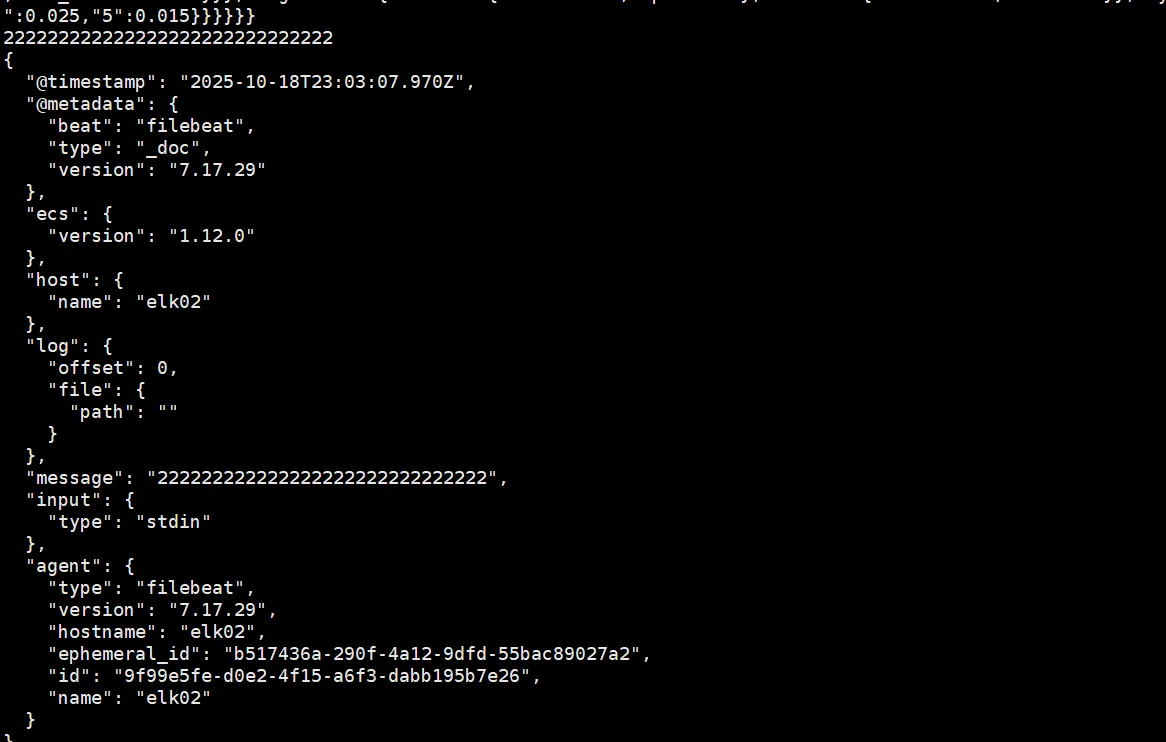
编写一个测试数据
jsfilebeat.inputs:
  - type: stdin

output.console:
  pretty: true
指定配置文件启动
jsfilebeat -e -c /etc/filebeat/filebeat.yml
本文作者:松轩(^U^)
本文链接:
版权声明:本博客所有文章除特别声明外,均采用 BY-NC-SA 许可协议。转载请注明出处!
目录